ה-UI שלכם כעץ
אפליקציית React שלך מתעצבת כאשר רכיבים רבים מקוננים זה בזה. איך React עוקב אחר מבנה הרכיבים של האפליקציה שלך?
React, וספריות UI רבות אחרות, מדגמים את UI כעץ. חשיבה על האפליקציה שלך כעל עץ שימושית להבנת הקשר בין רכיבים. הבנה זו תעזור לך לנפות באגים במושגים עתידיים כמו ביצועים וניהול state.
You will learn
- How React “רואה” מבנים של רכיבים
- מהו עץ טיוח ולמה הוא שימושי
- מהו עץ תלות מודול ולמה הוא שימושי
ממשק המשתמש שלך כעץ
עצים הם מודל קשר בין פריטים וממשק המשתמש מיוצג לרוב באמצעות מבני עצים. לדוגמה, דפדפנים משתמשים במבני עץ למודל HTML (DOM) ו-CSS (CSSOM). פלטפורמות ניידות משתמשות גם בעצים כדי לייצג את היררכיית התצוגה שלהן.
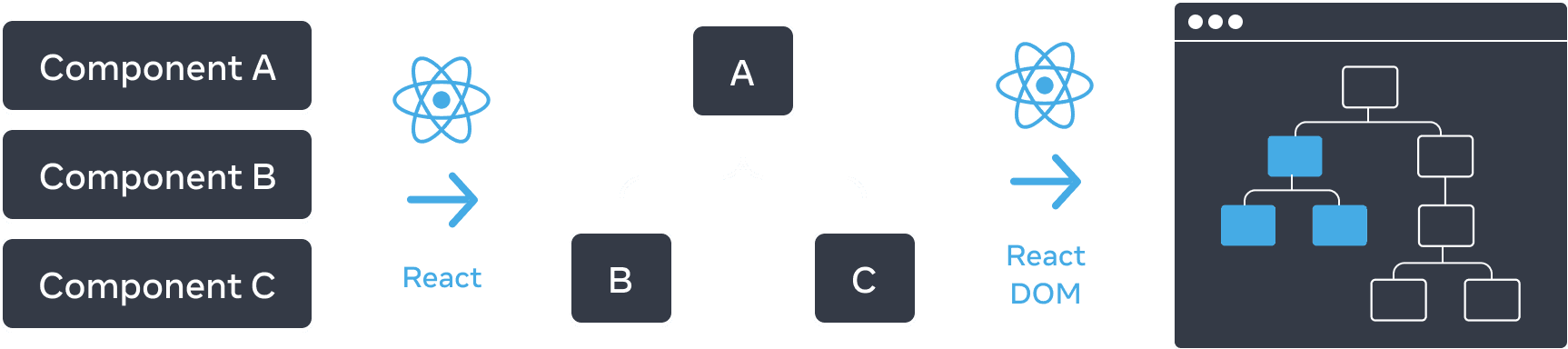
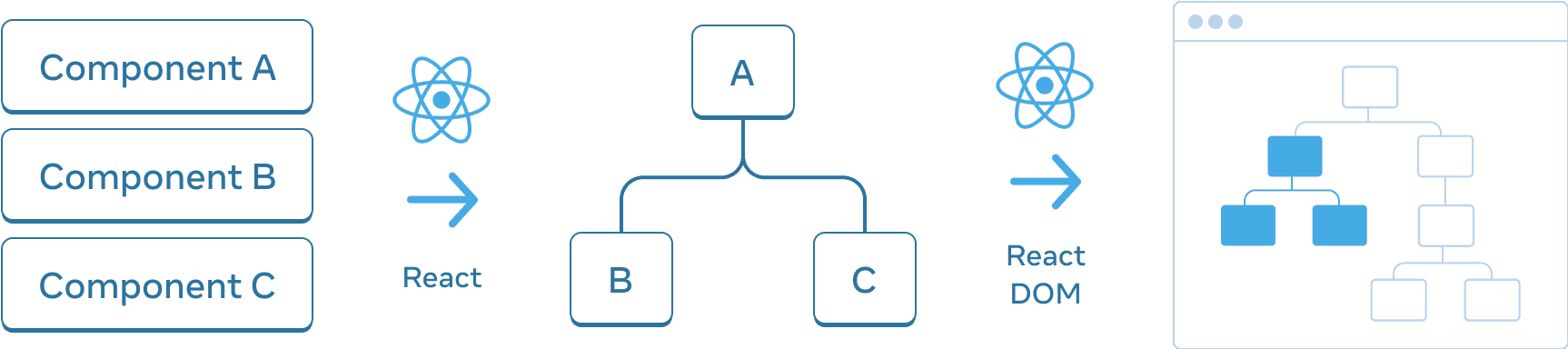
React יוצר עץ ממשק משתמש מהרכיבים שלך. בדוגמה זו, עץ ה-UI משמש לאחר מכן לעיבוד ל-DOM.
כמו דפדפנים ופלטפורמות ניידות, גם React משתמשת במבני עצים כדי לנהל ולדגמן את הקשר בין רכיבים באפליקציית React. עצים אלו הם כלים שימושיים כדי להבין כיצד נתונים זורמים דרך אפליקציית React וכיצד לייעל את העיבוד ואת גודל האפליקציה.
The Render Tree
תכונה עיקרית של רכיבים היא היכולת להרכיב רכיבים של רכיבים אחרים. כפי שאנו רכיבי הקן, יש לנו את הרעיון של רכיבי אב וילד, שבו כל רכיב הורה עשוי להיות בעצמו ילד של רכיב אחר.
כאשר אנו מעבדים אפליקציית React, אנו יכולים לדגמן את הקשר הזה בעץ, המכונה עץ העיבוד.
הנה אפליקציית React שמציגה ציטוטים מעוררי השראה.
import FancyText from './FancyText';
import InspirationGenerator from './InspirationGenerator';
import Copyright from './Copyright';

export default function App() {
  return (
    <>
      <FancyText title text="Get Inspired App" />
      <InspirationGenerator>
        <Copyright year={2004} />
      </InspirationGenerator>
    </>
  );
}
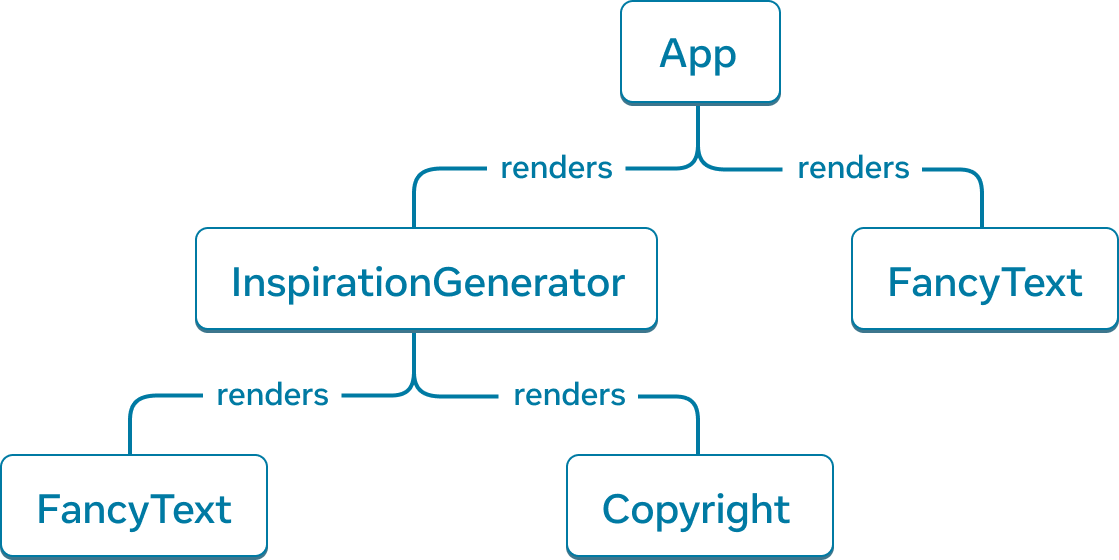
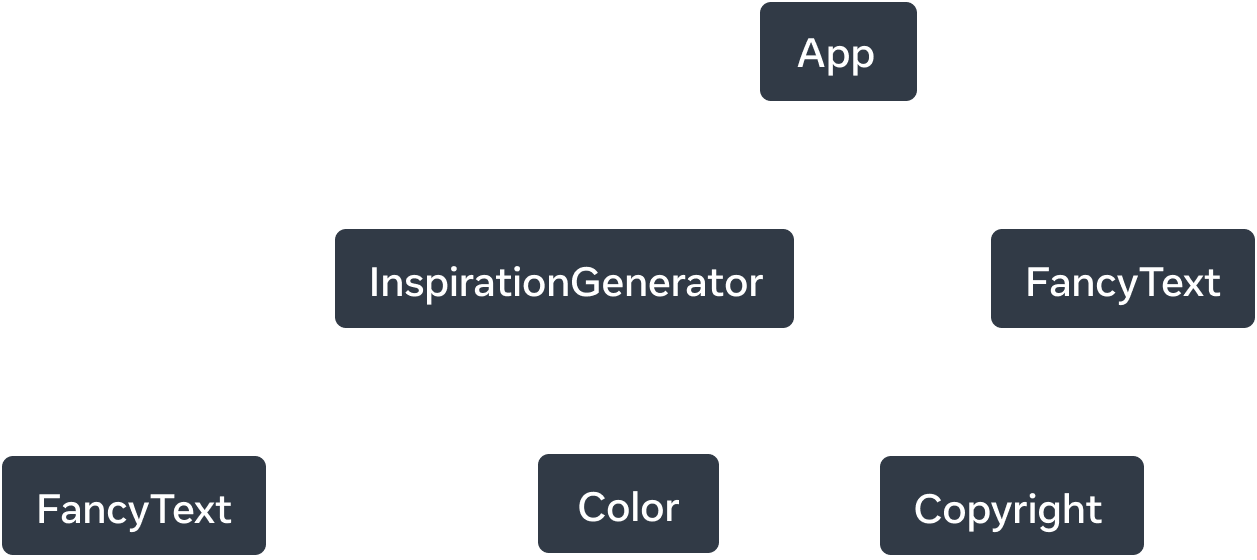
React יוצר עץ רינדור, עץ ממשק משתמש, המורכב מהרכיבים המעובדים.
מהאפליקציה לדוגמה, נוכל לבנות את עץ הרינדור לעיל.
העץ מורכב מצמתים, שכל אחד מהם מייצג רכיב. אפליקציה, FancyText, זכויות יוצרים, אם להזכיר כמה, הם כולם צמתים בעץ שלנו.
צומת השורש בעץ רינדור React הוא רכיב השורש של האפליקציה. במקרה זה, רכיב השורש הוא ‘אפליקציה’ וזהו הרכיב הראשון ש-React מעבד. כל חץ בעץ מצביע מרכיב אב לרכיב צאצא.
Deep Dive
תבחין בעץ הרינדור לעיל, אין אזכור לתגיות HTML שכל רכיב מעבד. הסיבה לכך היא שעץ הרינדור מורכב רק מ-React [רכיבים](למד/הרכיב-הראשון שלך#רכיבי-UI-אבני-בניין).
React, כמסגרת ממשק משתמש, היא אגנוסטית לפלטפורמה. ב-react.dev, אנו מציגים דוגמאות לעיבוד לאינטרנט, המשתמש בסימון HTML כפרימיטיביות ממשק המשתמש שלו. אבל אפליקציית React יכולה באותה מידה להיות עיבוד לפלטפורמה ניידת או שולחנית, שעשויה להשתמש בפרימיטיבים שונים של ממשק משתמש כמו UIView או FrameworkElement.
הפרימיטיבים האלה של ממשק המשתמש של הפלטפורמה אינם חלק מ-React. עצי רינדור React יכולים לספק תובנות לאפליקציית React שלנו ללא קשר לאיזו פלטפורמה האפליקציה שלך מעבדת.
עץ רינדור מייצג מעבר רינדור בודד של יישום React. עם עיבוד מותנה, רכיב אב עשוי לעבד ילדים שונים בהתאם לנתונים המועברים.
אנחנו יכולים לעדכן את האפליקציה כדי להציג ציטוט או צבע בצורה מותנית.
import FancyText from './FancyText';
import InspirationGenerator from './InspirationGenerator';
import Copyright from './Copyright';

export default function App() {
  return (
    <>
      <FancyText title text="Get Inspired App" />
      <InspirationGenerator>
        <Copyright year={2004} />
      </InspirationGenerator>
    </>
  );
}
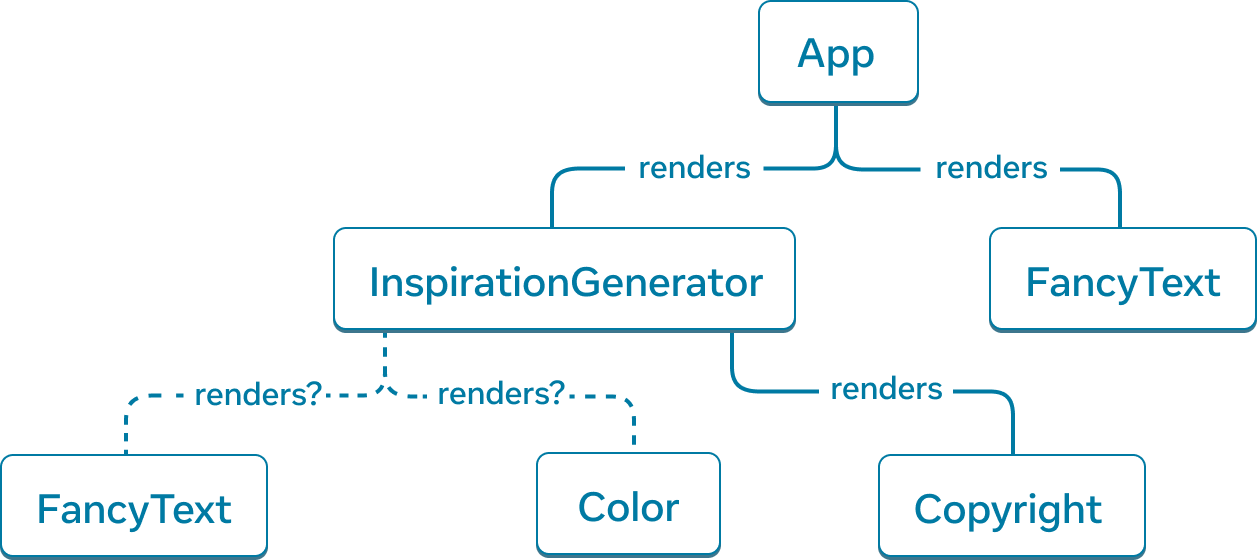
עם עיבוד מותנה, על פני עיבודים שונים, עץ העיבוד עשוי לעבד רכיבים שונים.
בדוגמה זו, בהתאם למה זה inspiration.type, אנו עשויים לעבד <FancyText> או <Color>. עץ העיבוד עשוי להיות שונה עבור כל מעבר עיבוד.
למרות שעצי רינדור עשויים להיות שונים בין מעברי רינדור, עצים אלה מועילים בדרך כלל לזיהוי מה הם הרמה העליונה ורכיבי העלים באפליקציית React. רכיבים ברמה העליונה הם הרכיבים הקרובים ביותר לרכיב השורש ומשפיעים על ביצועי הרינדור של כל הרכיבים שמתחתיהם ולעיתים מכילים את המורכבות ביותר. רכיבי העלים נמצאים קרוב לתחתית העץ ואין להם רכיבי צאצא ולעתים קרובות הם מעובדים מחדש.
זיהוי קטגוריות אלו של רכיבים שימושי להבנת זרימת הנתונים והביצועים של האפליקציה שלך.
The Module Dependency Tree
מערכת יחסים נוספת באפליקציית React שניתן לעצב עם עץ היא התלות במודול של אפליקציה. כאשר אנו מפרקים את הרכיבים שלנו והלוגיקה לקבצים נפרדים, אנו יוצרים מודולי JS שבהם אנו עשויים, או לייצא רכיבים קבועים, פונקציות.
כל צומת בעץ התלות של מודול הוא מודול וכל ענף מייצג הצהרת ‘ייבוא’ במודול זה.
אם ניקח את אפליקציית Inspirations הקודמת, נוכל לבנות עץ תלות של מודול, או בקיצור עץ תלות.
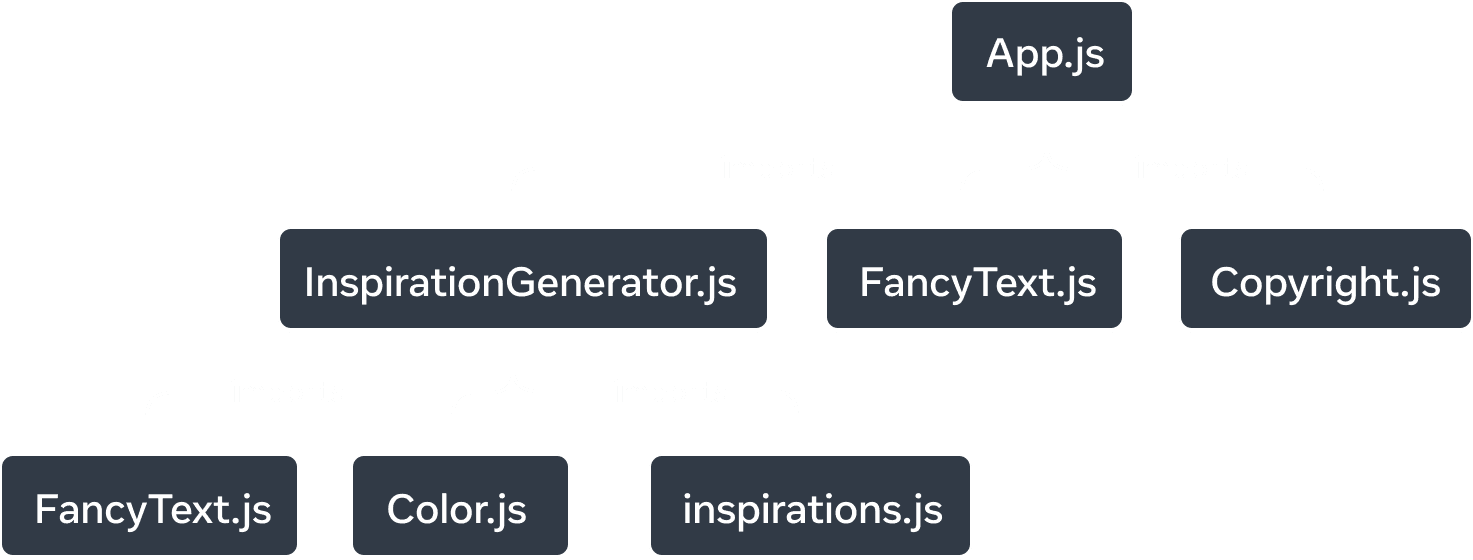
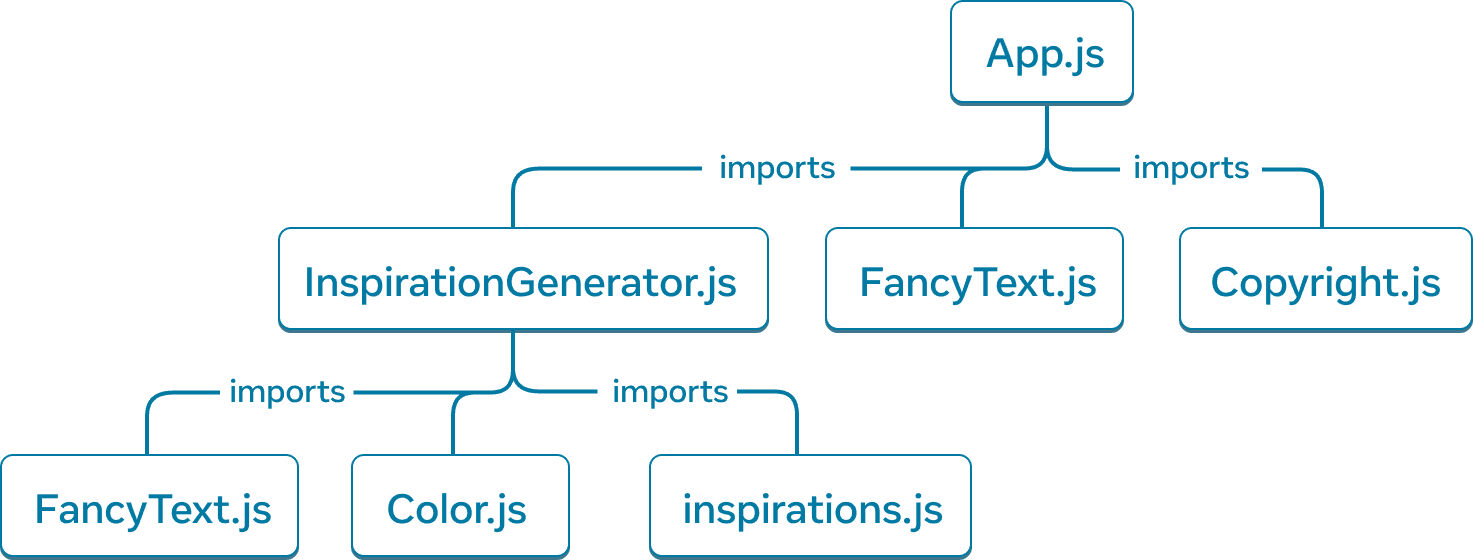
עץ התלות במודול עבור אפליקציית Inspirations.
צומת השורש של העץ הוא מודול השורש, הידוע גם כקובץ נקודת הכניסה. לעתים קרובות זה המודול שמכיל את רכיב השורש.
בהשוואה לעץ הרינדור של אותה אפליקציה, ישנם מבנים דומים אך כמה הבדלים בולטים:
- הצמתים המרכיבים את העץ מייצגים מודולים, לא רכיבים.
- מודולים שאינם רכיבים, כמו
inspirations.js, מיוצגים גם הם בעץ זה. עץ העיבוד מקפל רק רכיבים. Copyright.jsמופיע תחתApp.jsאך בעץ הרינדור,Copyright, הרכיב, מופיע כצאצא שלInspirationGenerator. הסיבה לכך היא ש-‘InspirationGenerator’ מקבל את JSX כ-children props, אז הוא הופך את ‘זכויות יוצרים’ כרכיב צאצא אך אינו מייבא את המודול.
עצי תלות שימושיים כדי לקבוע אילו מודולים נחוצים להפעלת אפליקציית React שלך. כאשר בונים אפליקציית React לייצור, יש בדרך כלל שלב בנייה שיצרף את כל ה-JavaScript הדרוש למשלוח ללקוח. הכלי שאחראי לכך נקרא bundler, ו-bunlers ישתמשו בעץ התלות כדי לקבוע אילו מודולים יש לכלול.
ככל שהאפליקציה שלך גדלה, לעתים קרובות גם גודל החבילה עושה זאת. גדלי חבילות גדולים יקרים ללקוח להוריד ולהפעיל. גדלים גדולים של חבילות יכולים לעכב את זמן הציור של ממשק המשתמש שלך. קבלת תחושה של עץ התלות של האפליקציה שלך עשויה לעזור באיתור בעיות אלו.
Recap
- עצים הם דרך נפוצה לייצג את היחסים בין ישויות. הם משמשים לעתים קרובות למודל ממשק משתמש.
- עצי רינדור מייצגים את הקשר המקנן בין רכיבי React על פני רינדור בודד.
- עם עיבוד מותנה, עץ העיבוד עשוי להשתנות בין עיבודים שונים. עם ערכי אב שונים, רכיבים עשויים להציג רכיבי ילדים שונים.
- עצי עיבוד עוזרים לזהות מהם הרכיבים ברמה העליונה והעלים. רכיבים ברמה העליונה משפיעים על ביצועי הרינדור של כל הרכיבים שמתחתיהם ורכיבי עלים מעובדים לעתים קרובות מחדש. זיהוים שימושי להבנת ביצועי רינדור וניפוי באגים.
- עצי תלות מייצגים את התלות במודול באפליקציית React.
- עצי תלות משמשים כלי בנייה כדי לאגד את הקוד הדרוש למשלוח אפליקציה.
- עצי תלות שימושיים לאיתור באגים בגדלים גדולים של חבילות שמאטות את זמן הצביעה וחושפים הזדמנויות לאופטימיזציה של הקוד שמצורף.