שיתוף state בין קומפוננטות
לפעמים, אתה רוצה שstateם של שני רכיבים ישתנה תמיד ביחד. כדי לעשות זאת, הסר מצב משניהם, העבר אותו להורה המשותף הקרוב ביותר שלהם, ולאחר מכן העביר אותו אליהם באמצעות props. זה ידוע בתור lifting state up וזה אחד הדברים הנפוצים ביותר שתעשו בכתיבת קוד React.
You will learn
- כיצד לחלוק מצב בין רכיבים על ידי הרמתו למעלה
- מהם רכיבים מבוקרים ובלתי מבוקרים
מצב הרמה למעלה לפי דוגמה
בדוגמה זו, רכיב ‘אקורדיון’ אב יוצר שני ‘פאנלים’ נפרדים:
אקורדיוןפאנלפאנל
לכל רכיב ‘פאנל’ יש מצב ‘isActive’ בוליאני שקובע אם התוכן שלו גלוי.
לחץ על כפתור הצג עבור שני הפאנלים:
import { useState } from 'react';

function Panel({ title, children }) {
  const [isActive, setIsActive] = useState(false);
  return (
    <section className="panel">
      <h3>{title}</h3>
      {isActive ? (
        <p>{children}</p>
      ) : (
        <button onClick={() => setIsActive(true)}>
          Show
        </button>
      )}
    </section>
  );
}

export default function Accordion() {
  return (
    <>
      <h2>Almaty, Kazakhstan</h2>
      <Panel title="About">
        With a population of about 2 million, Almaty is Kazakhstan's largest city. From 1929 to 1997, it was its capital city.
      </Panel>
      <Panel title="Etymology">
        The name comes from <span lang="kk-KZ">алма</span>, the Kazakh word for "apple" and is often translated as "full of apples". In fact, the region surrounding Almaty is thought to be the ancestral home of the apple, and the wild <i lang="la">Malus sieversii</i> is considered a likely candidate for the ancestor of the modern domestic apple.
      </Panel>
    </>
  );
}
שימו לב כיצד לחיצה על כפתור של לוח אחד לא משפיעה על הלוח השני - הם עצמאיים.
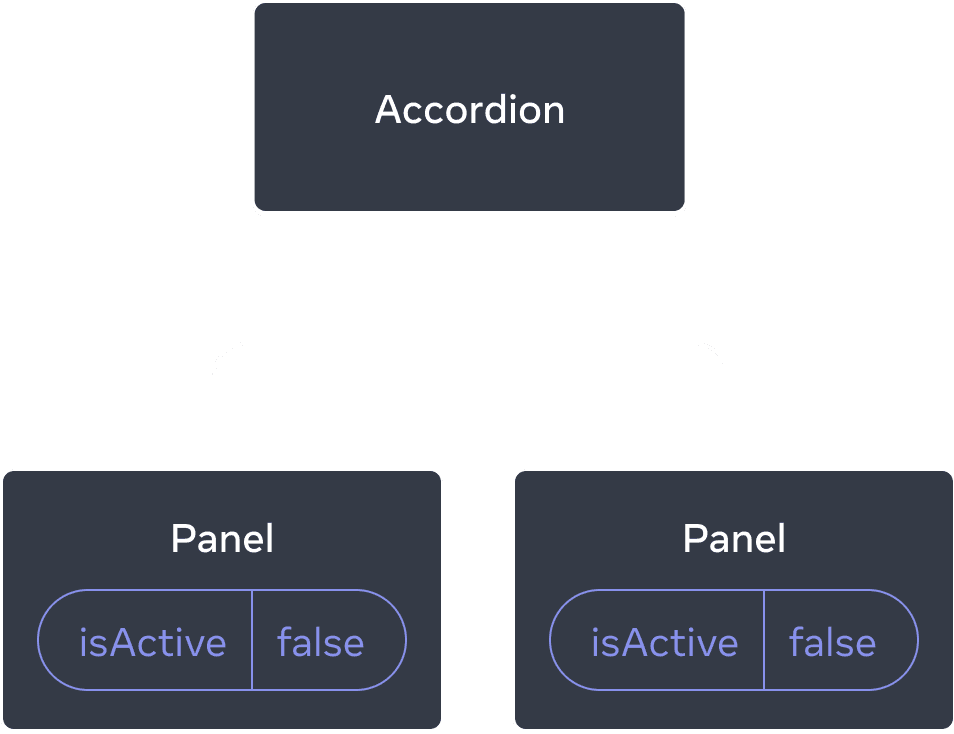
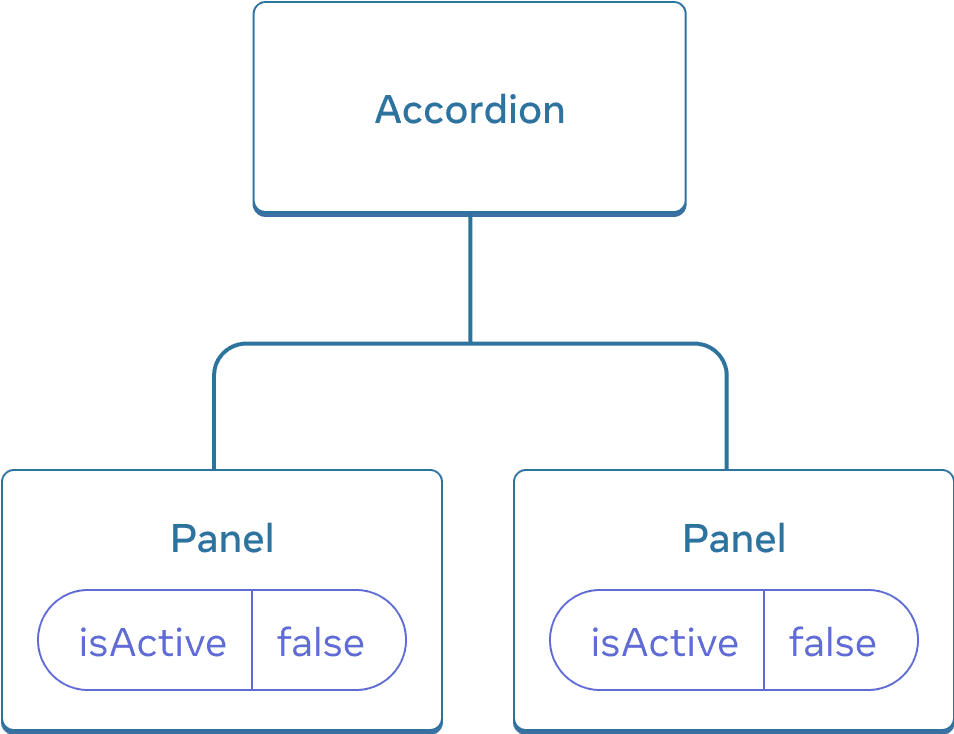
בתחילה, מצב ה-‘isActive’ של כל ‘פאנל’ הוא ‘שקר’, כך ששניהם נראים מכווצים
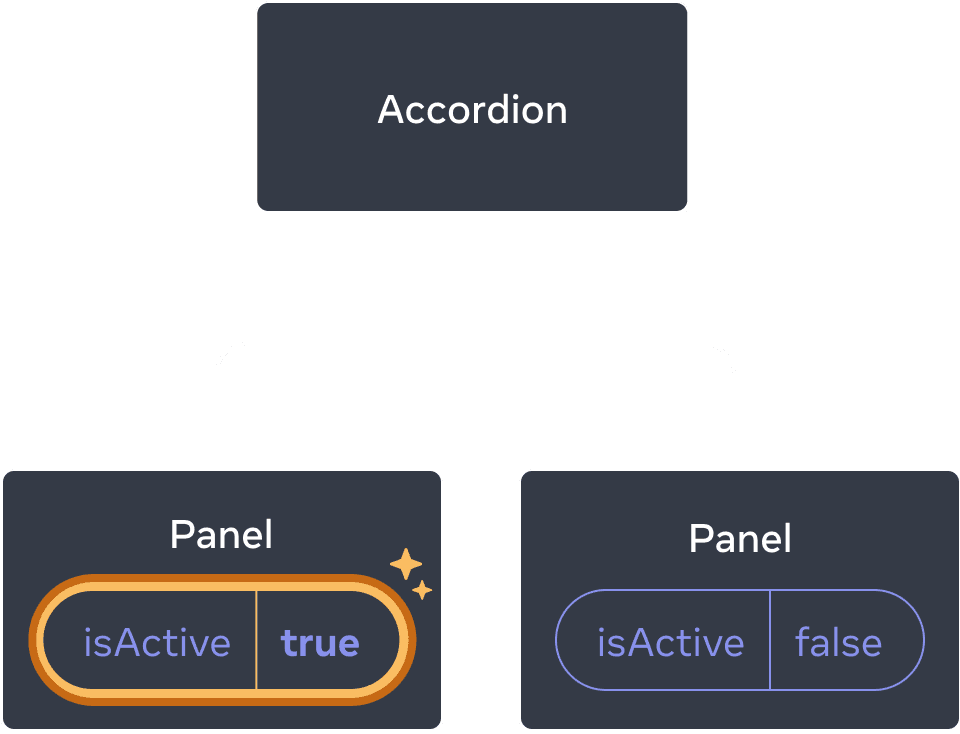
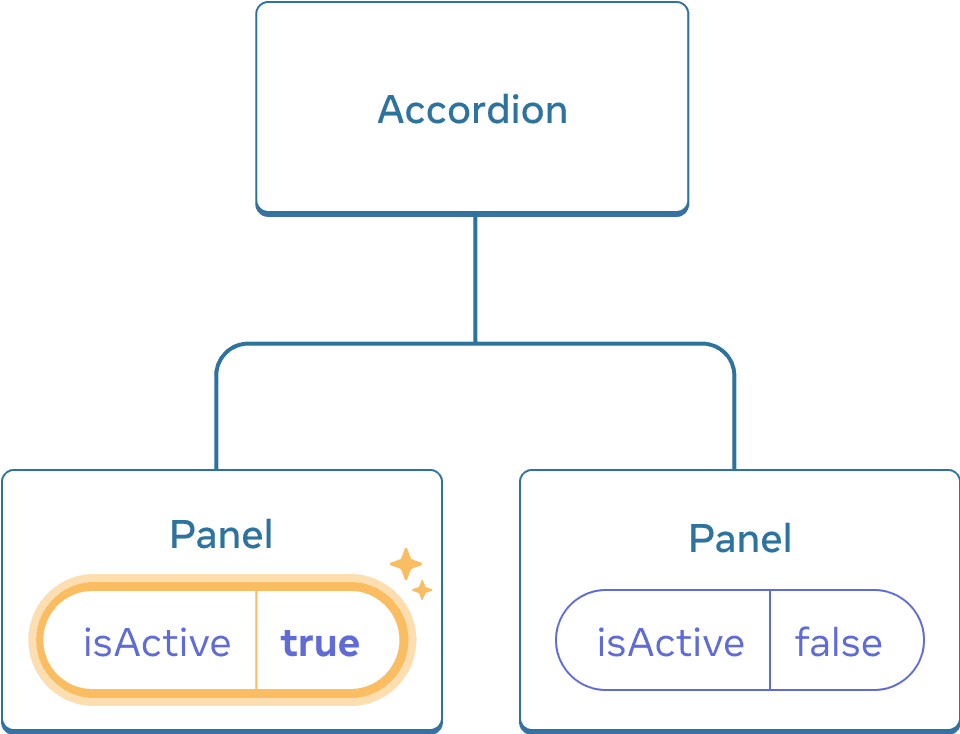
לחיצה על כפתורי ה’פאנל’ תעדכן רק את מצב ה’isActive’ של אותו ‘פאנל’ בלבד
אבל עכשיו נניח שאתה רוצה לשנות אותו כך שרק לוח אחד יורחב בכל זמן נתון. עם העיצוב הזה, הרחבת הפאנל השני אמורה לכווץ את הלוח הראשון. איך היית עושה את זה?
כדי לתאם את שני הלוחות הללו, עליך “להרים את מצבם” לרכיב אב בשלושה שלבים:
- הסר מצב ממרכיבי הצאצא.
- עבר נתונים מקודדים מההורה המשותף.
- הוסף מצב להורה המשותף והעביר אותו יחד עם מטפלי האירועים.
זה יאפשר לרכיב ‘אקורדיון’ לתאם את שני ה’פאנלים’ ולהרחיב רק אחד בכל פעם.
שלב 1: הסר מצב מהרכיבים הצאצאים
אתה תיתן שליטה ב-‘isActive’ של ה-Panel לרכיב האב שלו. משמעות הדבר היא שרכיב האב יעביר את ‘isActive’ ל’פאנל’ בתור props במקום. התחל על ידי הסרת השורה הזו מהרכיב ‘פאנל’:
const [isActive, setIsActive] = useState(false);ובמקום זאת, הוסף את ‘isActive’ לרשימת הprops של ה’פאנל’:
function Panel({ title, children, isActive }) {כעת רכיב האב של הפאנל יכול לשלוט בisActive על ידי העברתו בתור אב. לעומת זאת, לרכיב Panel אין כעת שליטה על הערך של isActive—זה תלוי כעת ברכיב האב!
שלב 2: העבר נתונים מקודדים קשיחים מההורה המשותף
כדי להעלות את הstate למעלה, עליך לאתר את רכיב האב המשותף הקרוב ביותר של שני רכיבי הצאצא שברצונך לתאם:
אקורדיון(הורה המשותף הקרוב ביותר)פאנלפאנל
בדוגמה זו, זה רכיב ‘אקורדיון’. מכיוון שהוא מעל שני הפאנלים ויכול לשלוט בprops שלהם, הוא יהפוך ל”מקור האמת” שעבורו הפאנל פעיל כרגע. הפוך את הרכיב ‘אקורדיון’ להעביר ערך מקודד של ‘isActive’ (לדוגמה, ‘true’) לשני הפאנלים:
import { useState } from 'react';

export default function Accordion() {
  return (
    <>
      <h2>Almaty, Kazakhstan</h2>
      <Panel title="About" isActive={true}>
        With a population of about 2 million, Almaty is Kazakhstan's largest city. From 1929 to 1997, it was its capital city.
      </Panel>
      <Panel title="Etymology" isActive={true}>
        The name comes from <span lang="kk-KZ">алма</span>, the Kazakh word for "apple" and is often translated as "full of apples". In fact, the region surrounding Almaty is thought to be the ancestral home of the apple, and the wild <i lang="la">Malus sieversii</i> is considered a likely candidate for the ancestor of the modern domestic apple.
      </Panel>
    </>
  );
}

function Panel({ title, children, isActive }) {
  return (
    <section className="panel">
      <h3>{title}</h3>
      {isActive ? (
        <p>{children}</p>
      ) : (
        <button onClick={() => setIsActive(true)}>
          Show
        </button>
      )}
    </section>
  );
}
נסה לערוך את ערכי ה-‘isActive’ המקודדים ברכיב ‘אקורדיון’ וראה את התוצאה על המסך.
שלב 3: הוסף מצב להורה המשותף
הרמת מצב למעלה משנה לעתים קרובות את האופי של מה שאתה מאחסן כstate.
במקרה זה, רק פאנל אחד צריך להיות פעיל בכל פעם. משמעות הדבר היא שרכיב האב הנפוץ ‘אקורדיון’ צריך לעקוב אחר איזה פאנל הוא הפאנל הפעיל. במקום ערך ‘בוליאני’, הוא יכול להשתמש במספר בתור האינדקס של ה’פאנל’ הפעיל עבור משתנה הstate:
const [activeIndex, setActiveIndex] = useState(0);כאשר activeIndex הוא 0, החלונית הראשונה פעילה, וכאשר היא 1, היא השנייה.
לחיצה על כפתור “הצג” בכל אחד מה’פאנלים’ צריכה לשנות את האינדקס הפעיל ב’אקורדיון’. פאנל לא יכול להגדיר את מצב activeIndex ישירות מכיוון שהוא מוגדר בתוך האקורדיון. הרכיב ‘אקורדיון’ צריך לאפשר במפורש לרכיב ה’פאנל’ לשנות את מצבו על ידי העברת מטפל באירועים כעזר:
<>
  <Panel
    isActive={activeIndex === 0}
    onShow={() => setActiveIndex(0)}
  >
    ...
  </Panel>
  <Panel
    isActive={activeIndex === 1}
    onShow={() => setActiveIndex(1)}
  >
    ...
  </Panel>
</>ה-<button> בתוך ה-Panel ישתמש כעת ב-‘onShow’ כמטפל באירועי קליק שלו:
import { useState } from 'react';

export default function Accordion() {
  const [activeIndex, setActiveIndex] = useState(0);
  return (
    <>
      <h2>Almaty, Kazakhstan</h2>
      <Panel
        title="About"
        isActive={activeIndex === 0}
        onShow={() => setActiveIndex(0)}
      >
        With a population of about 2 million, Almaty is Kazakhstan's largest city. From 1929 to 1997, it was its capital city.
      </Panel>
      <Panel
        title="Etymology"
        isActive={activeIndex === 1}
        onShow={() => setActiveIndex(1)}
      >
        The name comes from <span lang="kk-KZ">алма</span>, the Kazakh word for "apple" and is often translated as "full of apples". In fact, the region surrounding Almaty is thought to be the ancestral home of the apple, and the wild <i lang="la">Malus sieversii</i> is considered a likely candidate for the ancestor of the modern domestic apple.
      </Panel>
    </>
  );
}

function Panel({
  title,
  children,
  isActive,
  onShow
}) {
  return (
    <section className="panel">
      <h3>{title}</h3>
      {isActive ? (
        <p>{children}</p>
      ) : (
        <button onClick={onShow}>
          Show
        </button>
      )}
    </section>
  );
}
זה משלים את מצב הרמה למעלה! העברת הstate לרכיב האב המשותף אפשרה לך לתאם את שני הפאנלים. שימוש באינדקס הפעיל במקום שני דגלים “מוצג” הבטיח שרק פאנל אחד פעיל בזמן נתון. והעברת מטפל האירוע לילד אפשרה לילד לשנות את מצב ההורה.
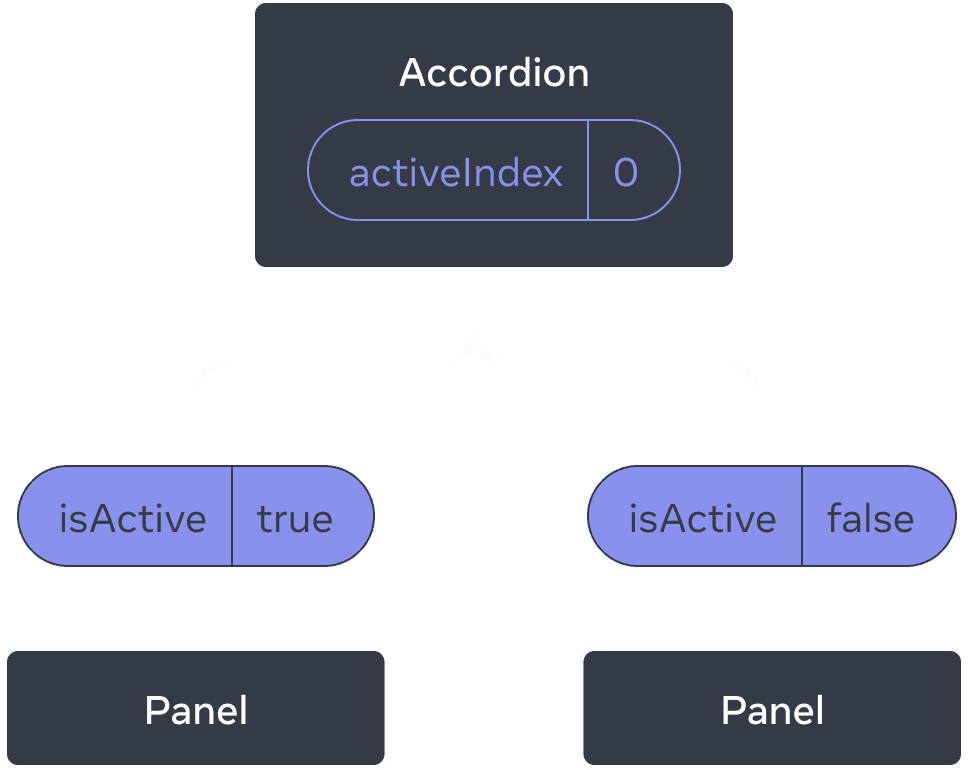
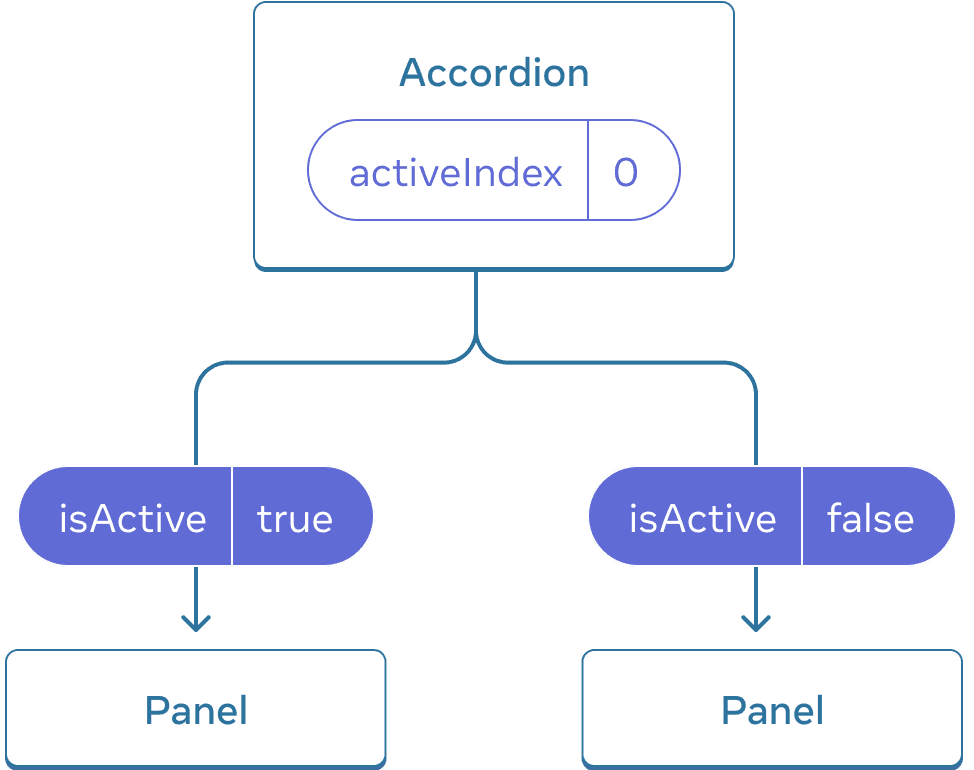
בתחילה, activeIndex של Accordion הוא 0, כך שהפאנל הראשון מקבל isActive = true
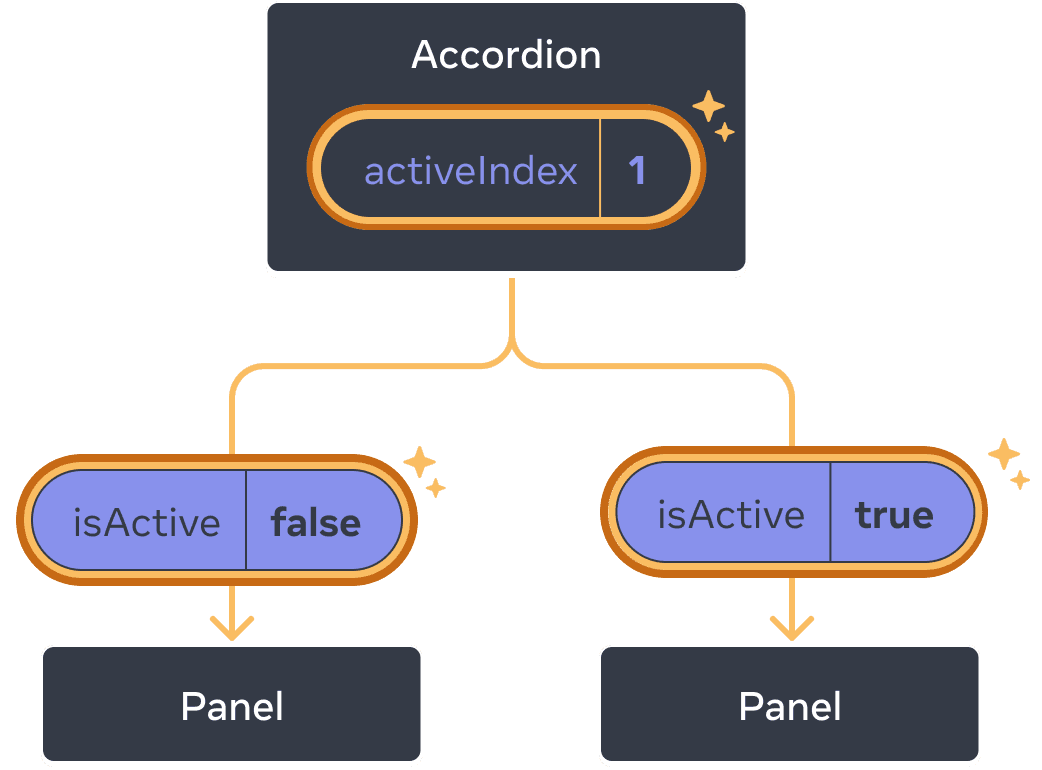
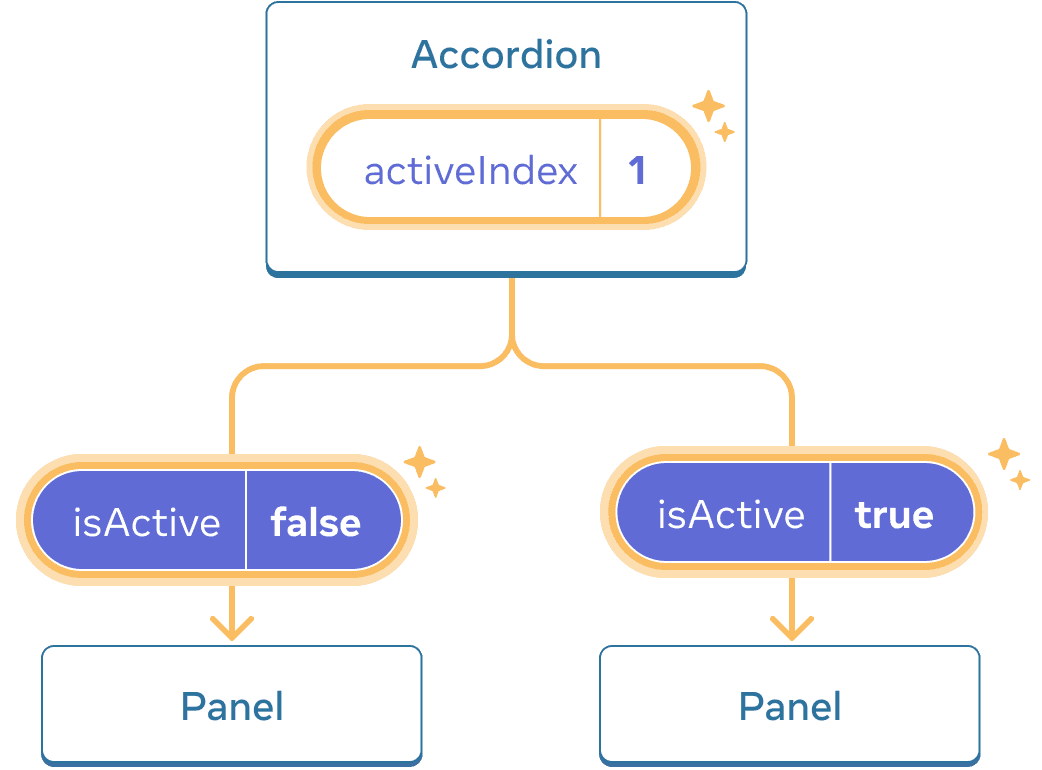
כאשר מצב activeIndex של Accordion משתנה ל1, הפאנל השני מקבל במקום זאת isActive = true
Deep Dive
מקובל לקרוא לרכיב עם state מקומית כלשהי “לא מבוקר”. לדוגמה, רכיב ה-‘Panel’ המקורי עם משתנה הstate ‘isActive’ אינו מבוקר מכיוון שהאב שלו אינו יכול להשפיע אם הפאנל פעיל או לא.
לעומת זאת, אפשר לומר שרכיב “נשלט” כאשר המידע החשוב בו מונע על ידי props ולא על ידי הstate המקומית שלו. זה מאפשר לרכיב האב לציין באופן מלא את ההתנהגות שלו. רכיב ה’פאנל’ הסופי עם הprops ‘isActive’ נשלט על ידי רכיב ה’אקורדיון’.
רכיבים לא מבוקרים קלים יותר לשימוש בתוך הוריהם מכיוון שהם דורשים פחות תצורה. אבל הם פחות גמישים כשרוצים לתאם אותם יחד. רכיבים מבוקרים הם גמישים בצורה מקסימלית, אך הם דורשים מרכיבי האב להגדיר אותם במלואם עם props.
בפועל, “נשלט” ו”בלתי מבוקר” אינם מונחים טכניים קפדניים - לכל רכיב יש בדרך כלל שילוב מסוים של state מקומית ושל props. עם זאת, זוהי דרך שימושית לדבר על האופן שבו רכיבים מתוכננים ומה היכולות שהם מציעים.
בעת כתיבת רכיב, שקול איזה מידע בו יש לשלוט (באמצעות props), ואיזה מידע צריך להיות בלתי מבוקר (דרך הstate). אבל אתה תמיד יכול לשנות את דעתך ולהתחיל מחדש מאוחר יותר.
מקור אמת יחיד לכל state
ביישום React, לרכיבים רבים יהיה מצב משלהם. מצב מסוים עשוי “לחיות” קרוב לרכיבי העלים (רכיבים בתחתית העץ) כמו תשומות. מצב אחר עשוי “לגור” קרוב יותר לחלק העליון של האפליקציה. לדוגמה, אפילו ספריות ניתוב בצד הלקוח מיושמות בדרך כלל על ידי אחסון המסלול הנוכחי בstate React והעברתו על ידי props!
עבור כל פיסת state ייחודית, תבחר את הרכיב ש”הבעלים” שלו. עיקרון זה ידוע גם כבעל “מקור אחד של אמת”. זה לא אומר שכל הstate חיה במקום אחד - אבל שלכל רכיב זה ישנה נתח מידע ספציפי. במקום לשכפל מצב משותף בין רכיבים, להרים אותו להורה המשותף שלהם, ולהעביר אותו לילדים שזקוקים לו.
האפליקציה שלך תשתנה תוך כדי עבודה עליה. זה נפוץ שתזוז את הstate למטה או בחזרה למעלה בזמן שאתה עדיין מגלה היכן כל חלק של הstate “חי”. כל זה חלק מהתהליך!
כדי לראות איך זה מרגיש בפועל עם עוד כמה רכיבים, קרא את Thinking in React.
Recap
- כאשר אתה רוצה לתאם שני מרכיבים, העבר את מצבם להורה המשותף שלהם.
- לאחר מכן העבירו את המידע דרך props מההורה המשותף שלהם.
- לבסוף, העבירו את מטפלי האירועים כדי שהילדים יוכלו לשנות את מצב ההורה.
- כדאי להתייחס לרכיבים כ”מבוקרים” (מונעים על ידי props) או “בלתי נשלטים” (מונעים על ידי state).
Challenge 1 of 2: כניסות מסונכרנות
שתי כניסות אלו אינן תלויות. לגרום להם להישאר מסונכרנים: עריכת קלט אחד אמורה לעדכן את הקלט השני באותו טקסט, ולהיפך.
import { useState } from 'react';

export default function SyncedInputs() {
  return (
    <>
      <Input label="First input" />
      <Input label="Second input" />
    </>
  );
}

function Input({ label }) {
  const [text, setText] = useState('');

  function handleChange(e) {
    setText(e.target.value);
  }

  return (
    <label>
      {label}
      {' '}
      <input
        value={text}
        onChange={handleChange}
      />
    </label>
  );
}